Vascular day view
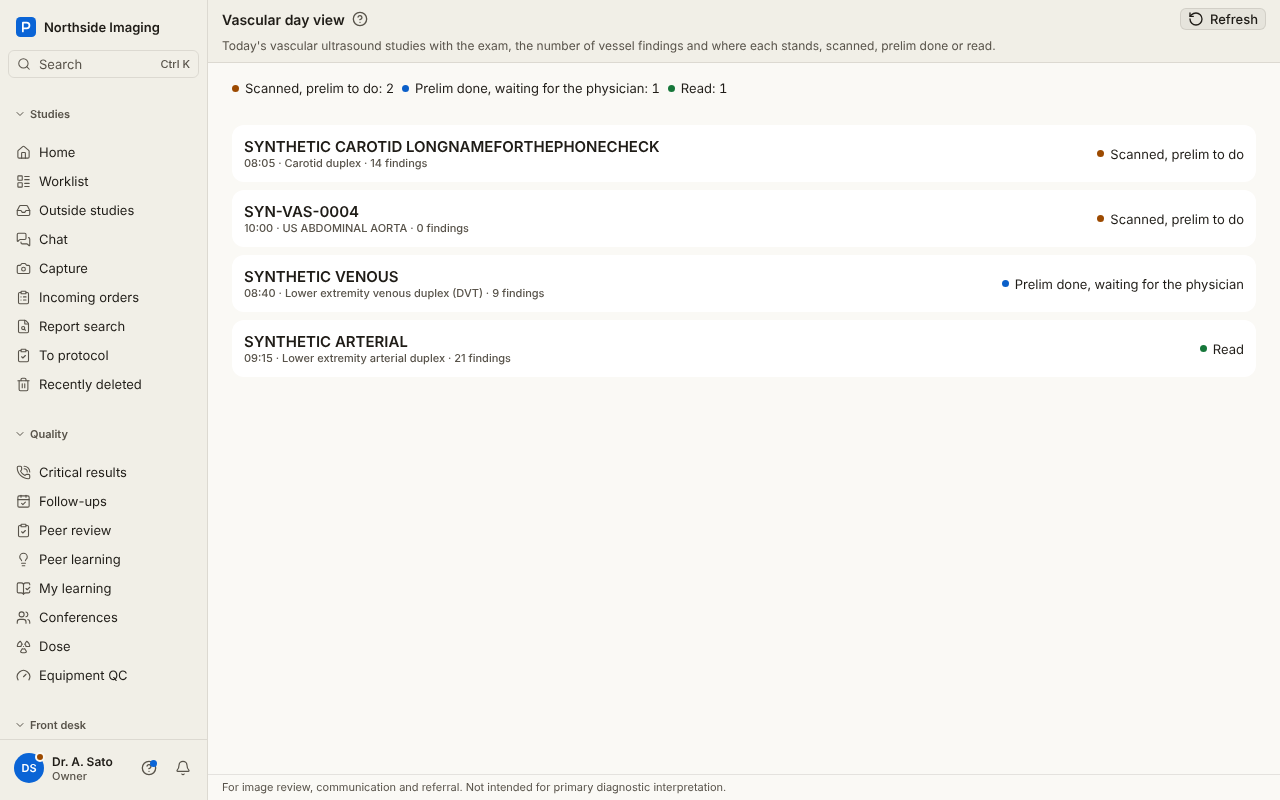
Today's vascular ultrasound studies with the exam, the number of vessel findings and where each stands, scanned, prelim done or read.
What this page is for
Specialties › Vascular day view lists today's ultrasound studies, grouped by where they stand and earliest first within each group. Each study shows:
- The time and the exam picked on the worksheet in the viewer's Vessels panel, or the study description when no exam was picked.
- How many vessel findings the study holds.
- Where it stands: Scanned, prelim to do; Prelim done, waiting for the physician once the sonographer chooses Prelim done; Read once the report is signed or the study is marked reviewed.
The page appears while the Vascular and vein pack is on under Settings › Specialties. It reads today's ultrasound studies by study date.
Who can use it
Members who can see studies see the day view. It shows only the studies you can already see on the worklist.
How to open a study or the timeline
- Open Specialties › Vascular day view.
- Select the patient's name to open their vascular timeline.
- Select the line under the name to open the study in the viewer.
Select Refresh to pick up studies that arrived since. A very busy day shows the first 300 ultrasound studies and says so.
Fields and columns
- Patient: the name from the images.
- Time, exam and findings: the study time, the exam, and the number of vessel findings saved.
- Stage: Scanned, prelim to do; Prelim done, waiting for the physician; or Read.
If something goes wrong
- The page is missing from the sidebar: the Vascular and vein pack is off under Settings › Specialties.
- A study is missing: its study date is not today, it is not ultrasound, or you cannot see that study on the worklist.
- A study stays at Scanned: the sonographer has not chosen Prelim done in the Vessels panel yet.
Related
Updated November 8, 2026. Signed in? The same article is in the app's help panel: press
?.