POCUS credentials
Track each clinician's QA-passed point-of-care ultrasound exams toward the program's rules, and grant, review and revoke privileges.
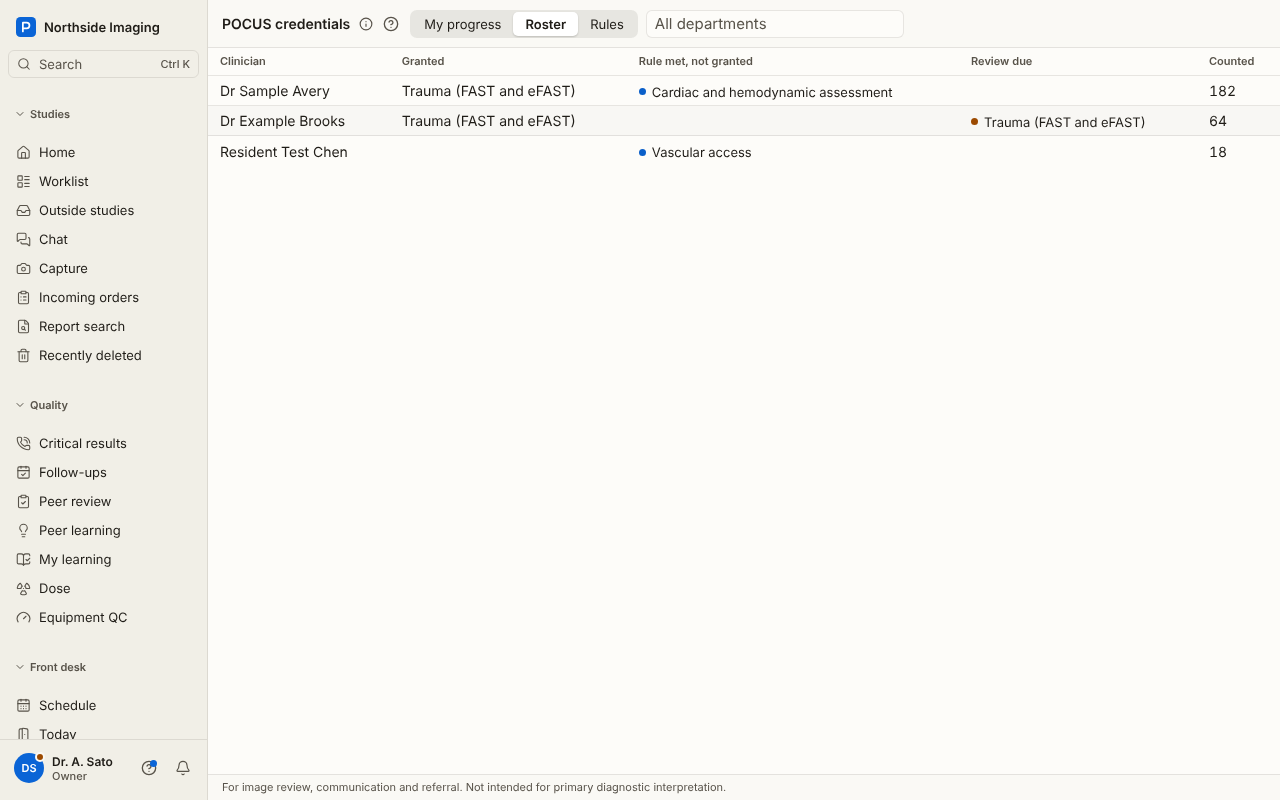
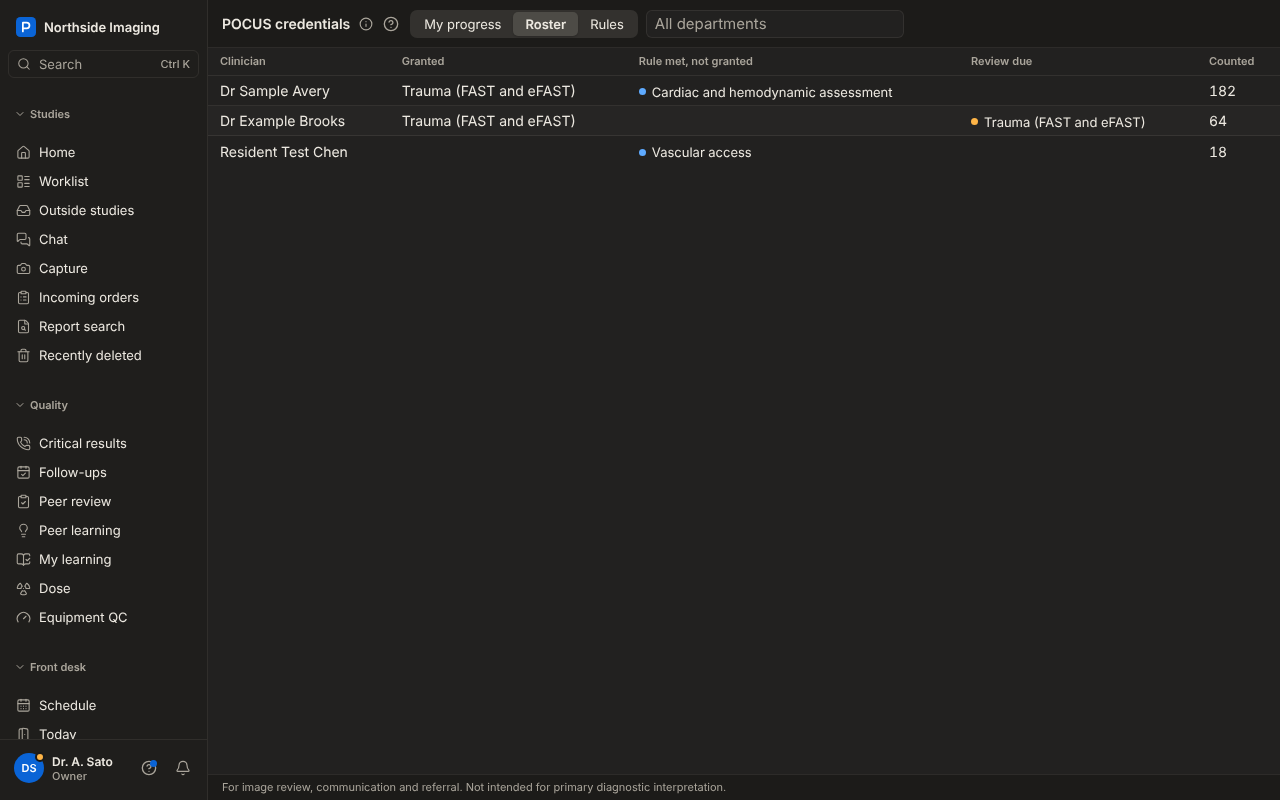
A point-of-care ultrasound (POCUS) program grants each clinician a privilege per application, such as eFAST or cardiac, once they have done enough exams that passed quality review. This page tracks that progress.
What this page is for
- My progress shows, for each application, your QA-passed exams against the rule, any exams counted from outside the program, and whether you hold the privilege and when it is due for review.
- Roster (reviewers and the director) lists every clinician with a reviewed exam, an outside count or a privilege. It shows what each holds, which rules are met but not yet granted, and which privileges are due for review. Choose a clinician to see their progress.
- Rules shows how many QA-passed exams each application needs.
Type a department at the top to see progress against that department's rules.
The page is part of the Point-of-care ultrasound pack. An owner or admin turns the pack on under Settings › Specialties.
Who can use it
Everyone with the POCUS scan permission sees their own progress and the rules. Reviewers (POCUS QA: owners, admins and physicians) also see the roster. Only the director (POCUS director: owners and admins) grants and revokes privileges, adds outside exams and changes the rules.
The starting rules
The rules start from the American College of Emergency Physicians 2016 guidelines: 25 QA-passed exams per application, 5 for procedures such as vascular access, and 150 overall. Your ultrasound director should confirm or change them. Veterinary applications start with no rule. A rule can also ask for a share of abnormal exams and a number of exams per year to keep the privilege.
How to grant a privilege
- Open Roster and choose the clinician.
- Choose Grant on the application's row.
- Set the start and review dates. Two years is suggested.
- If the rule is not met yet, type the reason. PacsPilot never grants a privilege by itself.
- Choose Grant. A privilege shows Review due soon 60 days before its review date.
Choose Revoke to end a privilege. Revoked privileges stay on the record.
How to count exams from outside the program
Open the clinician, choose Add under Exams from outside the program, pick the application, enter the number of exams and how many were abnormal, and name the document, such as a residency log.
How to make a portfolio for the credentials committee
Open the clinician and choose Portfolio PDF. The PDF lists their exams per application, QA results, outside exams and privileges with who granted them, and closes with your name and the time as the signing director. It holds counts only, no patient details.
How to change the rules
- Open Rules.
- Change the numbers in a row. The row marked \* applies to every department.
- To set a different rule for one department, choose Department rule, pick the application and type the department.
- Choose Save rules.
Fields and columns
- Progress: QA-passed exams plus outside exams, against the rule, and how many more abnormal exams the rule needs.
- Reviewed: exams of yours a reviewer has scored.
- Outside: exams counted from outside the program.
- Privilege: Granted, Review due soon (within 60 days), Review overdue, Starts later or Revoked, with the review date.
- On the roster, Rule met, not granted lists applications ready for the director, and Review due lists privileges to renew.
If something goes wrong
- Grant is refused: the review date must be after the start date, and a grant before the rule is met needs a reason.
- A clinician is missing from the roster: they show once they have a reviewed exam, an outside count or a privilege.
- The clinician must be a member of this practice: privileges and outside counts can only name members of your practice.
Related
Updated November 1, 2026. Signed in? The same article is in the app's help panel: press
?.