POCUS to attest
Learners' signed point-of-care ultrasound worksheets that wait for an attending to agree, edit or mark them educational.
What this page is for
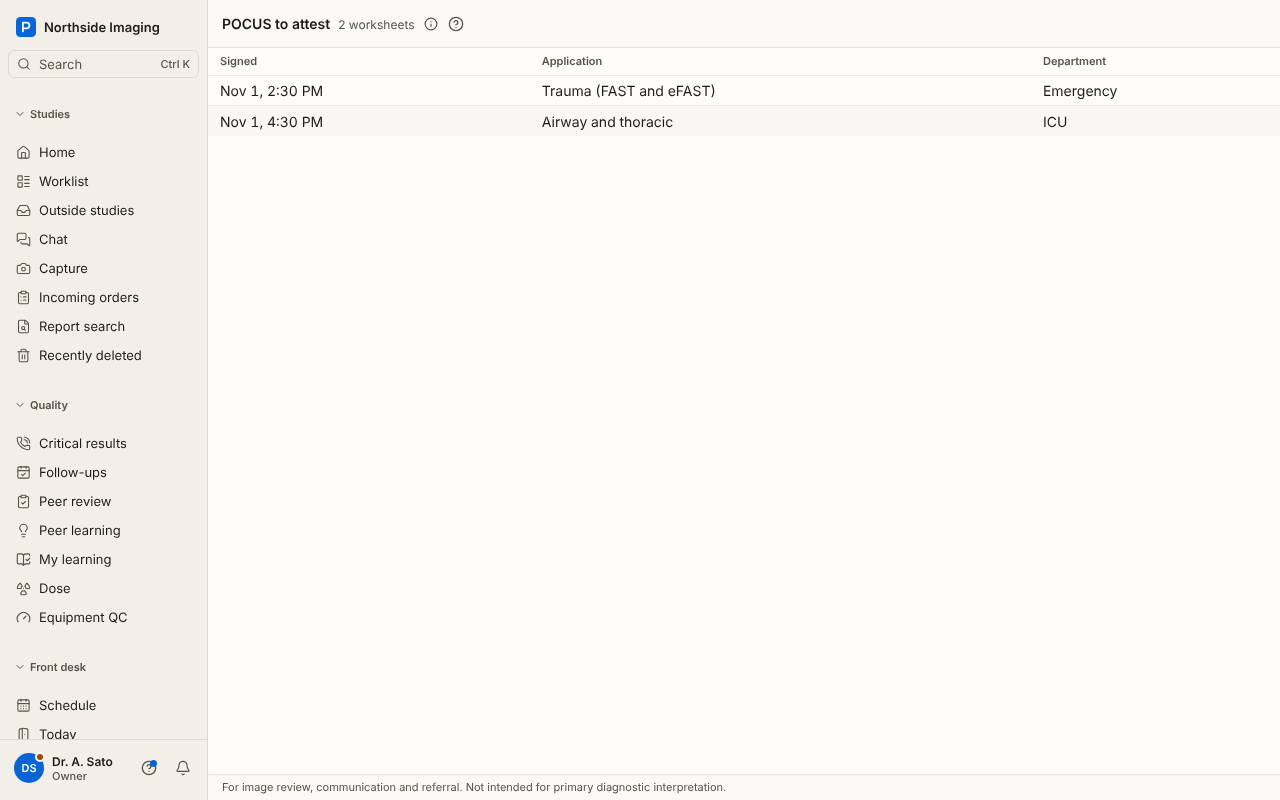
Specialties › POCUS to attest lists the point-of-care ultrasound worksheets that trainees signed and that still need an attending. A learner's worksheet goes to the record and to billing only once an attending attests it. Your own exams are not listed.
The page appears while the Point-of-care ultrasound pack is on under Settings › Specialties.
Who can use it
Owners, admins and physicians can attest. Trainees fill and sign worksheets but cannot attest them. Each worksheet follows its study's visibility. Signing, attesting and amending are in the audit log.
How to attest a worksheet
1. Open Specialties › POCUS to attest. The oldest signed worksheet is at the top. 2. Select a row to open the worksheet. Press Open images to review the clips in the viewer. 3. Pick one: - Agree and attest: the worksheet is final as the learner signed it. - Edit: change the answers, then press Attest with my changes. The learner sees each change, with the value before and after. - Mark educational: the exam was a training scan. It is not sent to the record and is never billed.
Filling and signing a worksheet
Open Specialties › POCUS exams and press Worksheet on an exam.
- Pick the application, for example Trauma (FAST and eFAST). The form is the program's current worksheet for that application; an exam keeps the version it was started on.
- Answer the questions. Fill normal fills each field with its normal answer, and some answers carry over from your last exam of the same application.
- Press Save draft to come back later, or Sign when you are done. Required fields must be answered before you can sign.
When the practice uses a cleared ultrasound AI app through the AI hub, a value the app measured, such as an automatic ejection fraction, shows under its field with an AI badge, the app's name and its regulatory label. It is only a suggestion: the field keeps what you entered, and Use copies the AI value into the field. The suggestion disappears once the field holds the same value.
After signing, a worksheet changes only through Amend, with a reason. The signer, the attending and owners or admins can amend.
When a final worksheet flags an incidental finding and follow-up tracking is on, the worksheet asks for a follow-up. Pick the exam, body region and interval, and the follow-up is tracked until a matching exam is signed.
Fields and columns
| Column | What it shows |
|---|---|
| Signed | When the learner signed the worksheet. |
| Application | The exam type. |
| Department | The department the exam belongs to. |
If something goes wrong
- A learner's exam is not listed. It shows only after the learner presses Sign, and only when the practice requires attestation for the exam's department under Settings › POCUS program.
- I cannot press Sign. A required field is empty. The message at the top names it.
- The charge says Held. The billing reviewer has not confirmed this year's codes under Settings › POCUS program, or a bill check needs an answer. The charge card on the worksheet says which.
Related
Updated November 6, 2026. Signed in? The same article is in the app's help panel: press
?.