Your bills
See what you owe the practice and the payments you made, and pay online on Stripe's secure page.
What this page is for
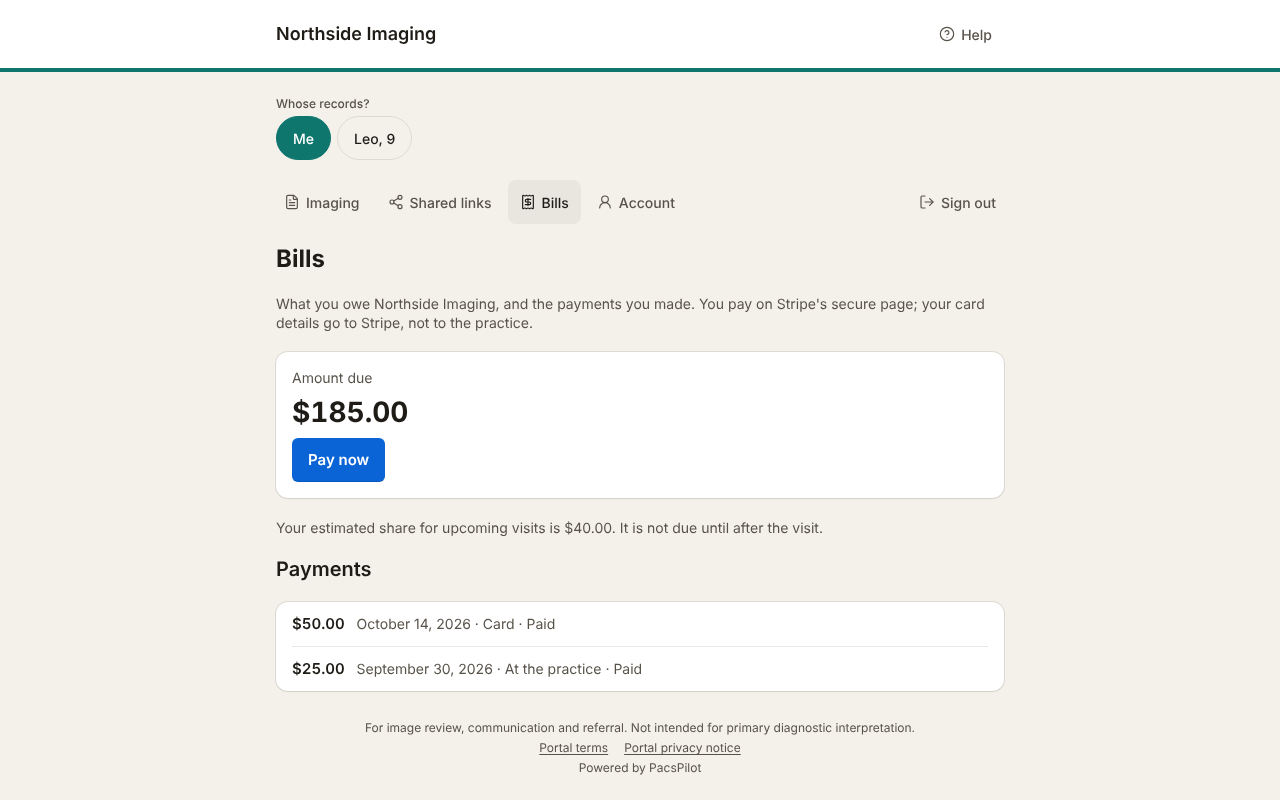
This page shows what you owe the practice and the payments you made. You can pay all or part of what you owe online.
You pay on Stripe's secure page. Your card details go to Stripe. They never go to the practice or to PacsPilot.
Who can use it
You can use it if your practice lets patients pay in the portal. If it does not, you do not see Bills at the top of the page.
If you look after someone else's records, you see their bills only if they or the practice let you handle their bills.
How to pay your bill
- Choose Bills at the top of the page.
- Choose Pay now.
- Leave the amount as it is to pay it all, or type a smaller amount.
- Choose Continue to pay.
- Choose Pay on the next page. Stripe's secure page opens.
- Enter your card and choose Pay.
You get a receipt by email. The payment shows on this page once Stripe tells the practice it went through. This can take a minute.
How to remove a card on file
If you agreed to let the practice keep a card, it shows under Cards on file with its brand, last 4 digits and expiry. Choose Remove, then Remove card. The practice can no longer charge it. A payment plan on that card stops until you and the practice set up another card.
Fields and columns
| Name | What it means |
|---|---|
| Amount due | What you owe the practice now. |
| Estimated share | What you will likely owe for a visit that has not happened yet. |
| Payments | Each payment you made, newest first, with its date. |
| Card | You paid by card, online or at the practice. |
| At the practice | You paid with cash, a check or another way at the practice. |
| Paid | The payment went through. |
| Refunded or Partly refunded | The practice gave some or all of the money back. |
| Payment plan | What is left on a monthly plan, and the next charge and date. |
| Cards on file | Cards you agreed the practice may keep. Remove takes one off. |
If something goes wrong
- You do not owe anything right now. There is nothing to pay.
- To pay, call the practice. Online payment is not available. Call the practice to pay.
- Paying online is not available right now. Call the practice to pay.
- Your bills could not be loaded. Try again.
- The card could not be removed. Try again, or call the practice.
- Your payment does not show yet. Wait a minute and open Bills again. If it still does not show, call the practice.
Related
Updated November 15, 2026. Signed in? The same article is in the app's help panel: press
?.