Your scan and report
One scan in your patient portal. Read the report, view the images, download them, or share them with a doctor.
What this page is for
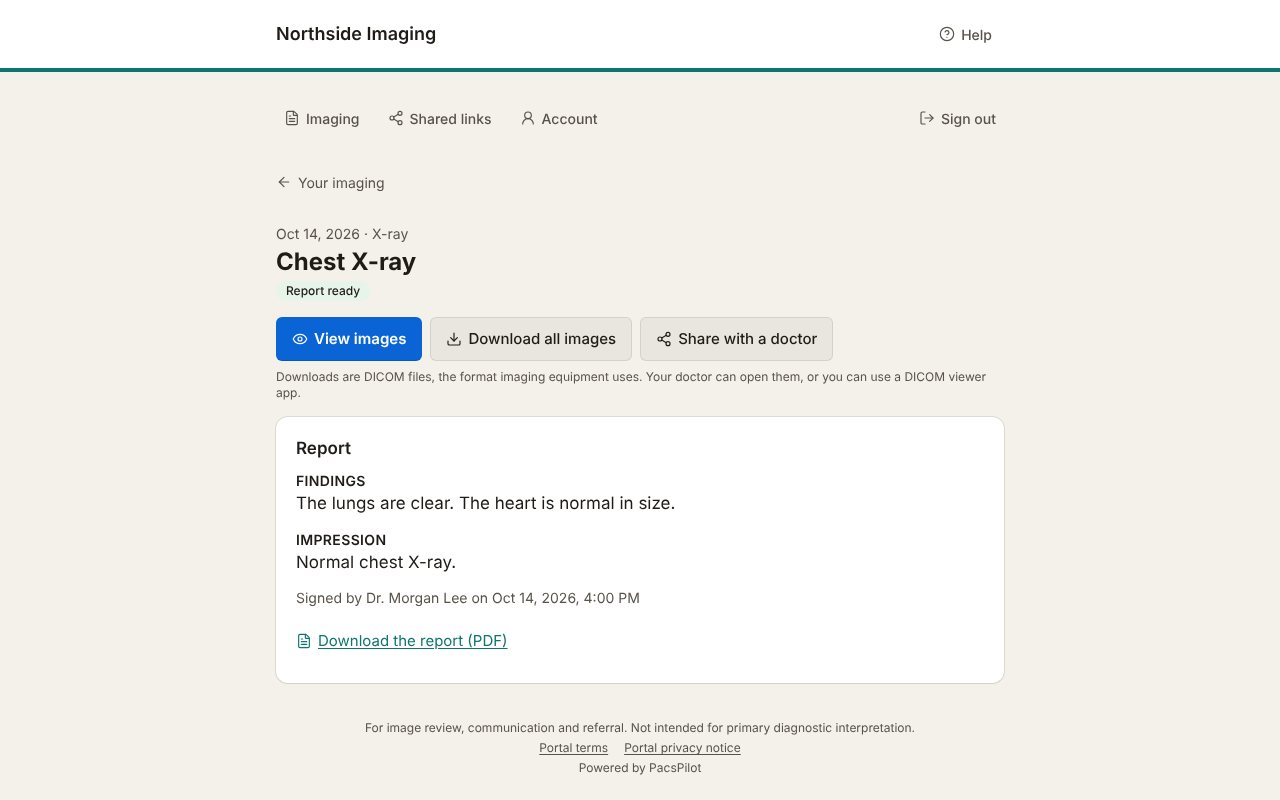
This page shows one of your scans. At the top are the date, the name and the kind of scan. Below it is the report from the doctor who read your scan.
From here you can view your images, save a copy of them, or share them with another doctor.
Who can use it
You can use it if your practice invited you to its patient portal. Your practice decides if you can download or share images. If it does not allow this, you do not see those buttons.
How to read your report
Your practice may add a summary in plain words above the report, under In plain words. It helps you understand the report, but the report itself is the official result.
- Scroll to Report.
- Read each part of the report.
- To save or print it, choose Download the report (PDF).
If the report was changed after it was signed, it says Amended. The reason is at the end. To see the older text, open Earlier version.
If you have questions about what your report means, ask your doctor.
How to view your images
- Choose View images.
- The images open in the image viewer.
- Use the back link in the viewer to come back here.
How to download your images
- Choose Download all images.
- Keep the page open. It can take a few minutes.
- The download starts when it is ready.
The files are DICOM files. That is the format scan machines use. Your doctor can open them. You can also use a DICOM viewer app.
How to make a CD or USB copy
- Choose Download for a CD or USB.
- Choose the scans and what to include, then Make the copy.
- Download the copy when it is ready. See Put your images on a CD or USB stick for more.
How to share your images with a doctor
- Choose Share with a doctor.
- Follow the steps. See Links you have shared for more.
Fields and columns
| Name | What it means |
|---|---|
| Date and kind | When the scan was done, and what kind it was. |
| Report ready | The report is ready to read. |
| Report pending | The report is not ready yet. |
| Images processing | The images are not ready to view yet. |
| Report | The doctor's report, in parts. |
| Signed by | The doctor who signed the report, and when. |
| Amended | The report was changed and signed again. |
| Earlier version | The report as it was before it was changed. |
If something goes wrong
- The report is not ready yet. Your practice will email you when it is.
- Your images are still being processed. Try again later.
- The images could not be opened. Wait a moment, then try again.
- The download could not be prepared. Try again later. A very large scan may be too big to download. Ask your practice for a copy.
- This study is not in your portal. Go back to your list of scans. If you need this scan, call your practice.
Related
Updated November 8, 2026. Signed in? The same article is in the app's help panel: press
?.