Moving in from another pulmonology system
Check how an old PFT, bronchoscopy or sleep archive folder and a lung screening list would match your patients before anything is imported.
What this page is for
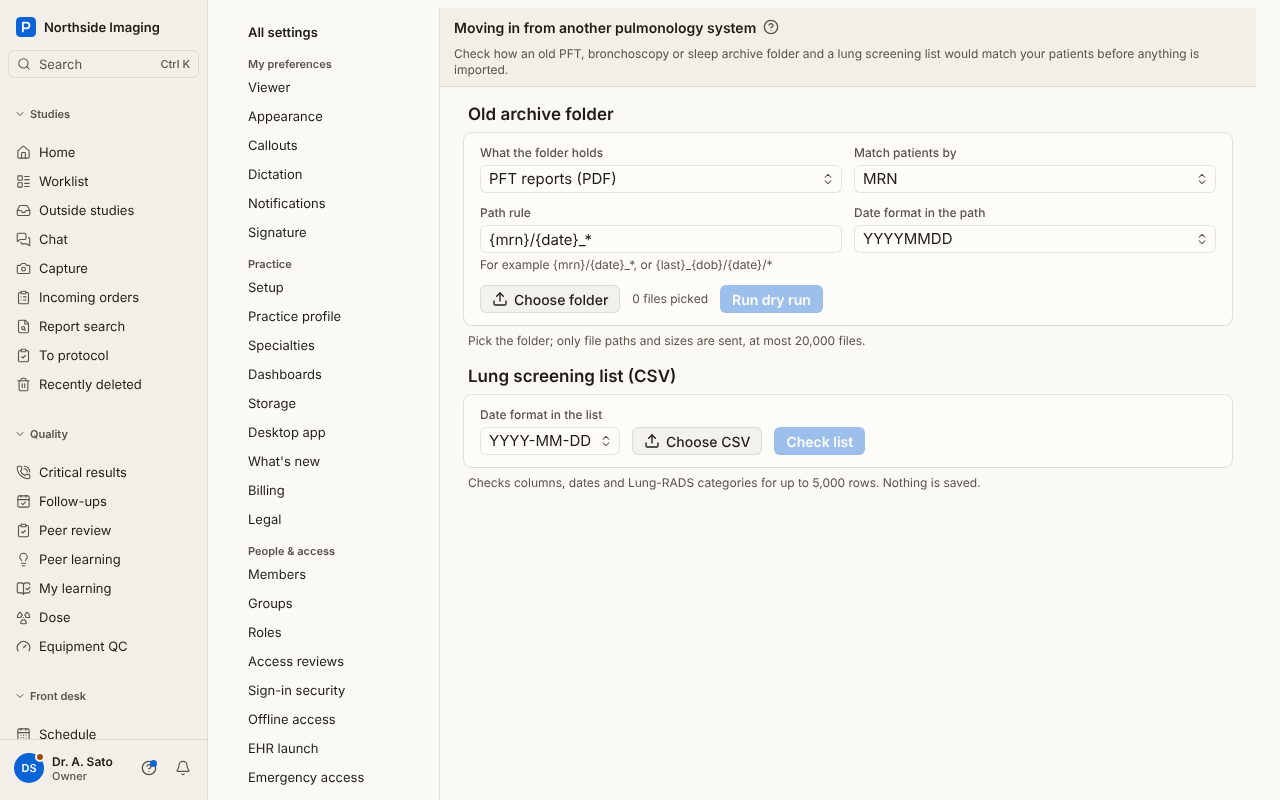
Settings › Specialties lists the steps for moving in from another pulmonology system while the Pulmonology pack is on. This page runs the two dry runs those steps name. A dry run shows what would match and what would not. Nothing is imported or saved.
Who can use it
Owners and admins.
How to check an archive folder
- Pick what the folder holds: PFT reports, bronchoscopy images and video, or sleep recordings (shown while sleep studies are on).
- Pick how paths name the patient: MRN, accession, or last name and birth date.
-
Write the path rule, such as
{mrn}/{date}_*, and pick the date format used in the paths. - Select Choose folder and pick the archive's top folder. Only file paths and sizes are sent.
- Select Run dry run. The result counts matched files and patients by file type and lists files that did not match, with the reason.
How to check a lung screening list
- Export the screening list as CSV, at most 2 MB.
- Pick the date format the list uses and select Choose CSV.
- Select Check list. The result counts rows that are ready, rows with problems and patients past their next screening date, and lists each problem by row.
Fields and columns
- What the folder holds: the old system's archive type; it decides which file types are expected.
-
Path rule: how the folder names patients and dates.
{mrn},{accession},{last},{dob}and{date}are read from the path;*matches anything. - Matched and Not matched: files that would be filed against a patient, and the rest with the reason.
- Past their next screening date: rows whose next low-dose CT is already due.
If something goes wrong
- The path does not follow the rule: change the rule until most files match, then check the rest by hand.
- This file type is not expected in this archive: the folder mixes archives; check each archive with its own type.
- The same patient is on an earlier row: the list has duplicates; keep one row per patient.
Related
- Specialties
- PFT lab: the Sleep studies article covers sleep studies
Updated November 8, 2026. Signed in? The same article is in the app's help panel: press
?.