Links you have shared
Links you made to show your images to a doctor. See who has them and how often they were opened, and stop sharing at any time.
What this page is for
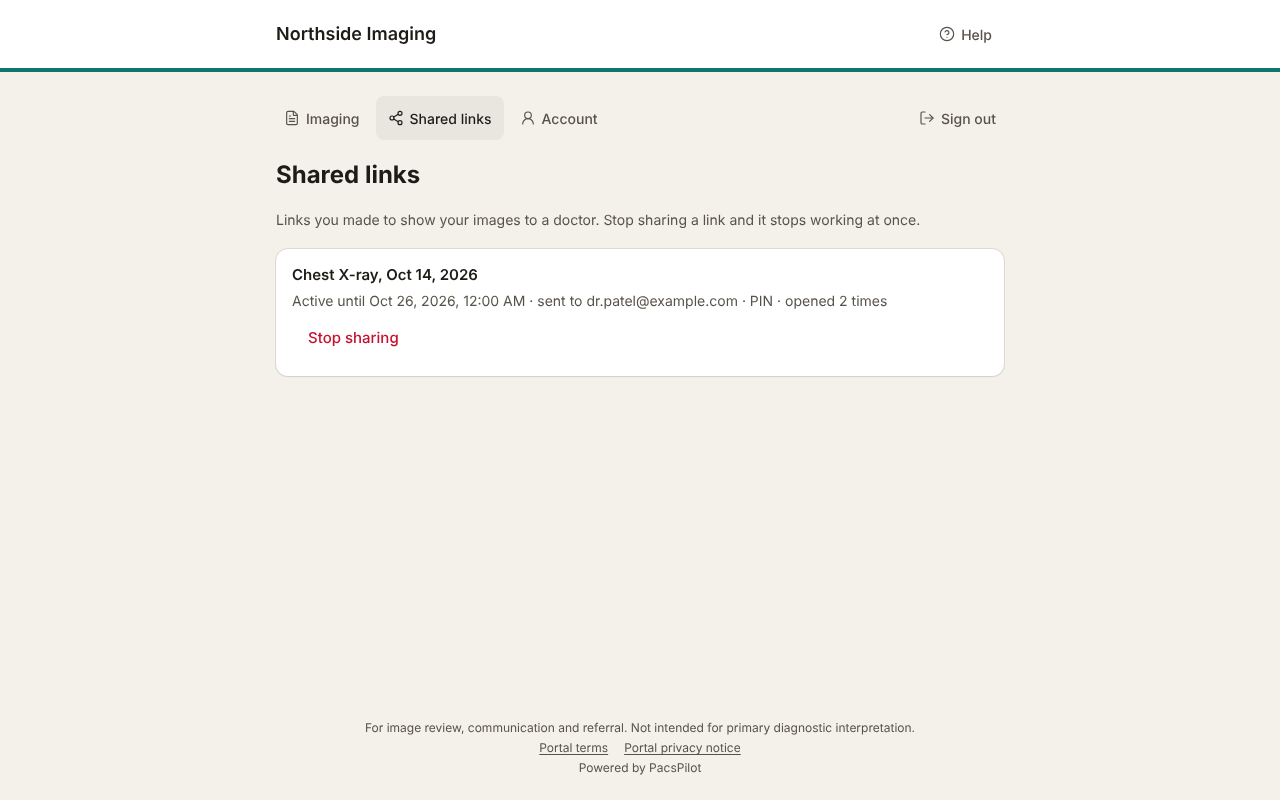
You can make a link that lets a doctor see your images. This page lists the links you made. For each one you see if it still works, who you sent it to and how many times it was opened.
You can stop sharing a link at any time. It stops working at once.
Who can use it
You can use it if your practice lets patients share images. If it does not, you do not see Shared links at the top of the page.
How to share your images with a doctor
- Open the scan you want to share.
- Choose Share with a doctor.
- If you like, type the Doctor's email. We send them the link only, never your results.
- Pick how long the link works: 7 days or 30 days.
- Leave Protect the link with a PIN on. We suggest it.
- Tick Let the doctor download the images if they need a copy.
- Choose Create link.
- Copy the link now. For your safety it is shown only once.
- Give the PIN to your doctor in a different way, for example by phone. The link does not work without it.
How to stop sharing
- Find the link on this page.
- Choose Stop sharing.
- Choose Stop sharing again to confirm.
No one can open your images with that link after this.
Fields and columns
| Name | What it means |
|---|---|
| Name | The scan you shared and its date. |
| Active | The link works. It shows the day it stops working. |
| Expired | The link is too old and no longer works. |
| Stopped | You stopped sharing this link. |
| Locked after wrong PINs | Someone typed the wrong PIN too many times, so the link is locked. |
| sent to | The email you sent the link to. |
| PIN or no PIN | If the link needs a PIN. |
| opened | How many times the link was opened. |
If something goes wrong
- You have not shared anything yet. Open a scan and choose Share with a doctor.
- The link could not be made. Try again.
- The link could not be stopped. Try again. If it still fails, call your practice.
- Your shared links could not be loaded. Check your internet, then choose Try again.
- You lost the link or the PIN. Stop sharing the old link and make a new one.
Related
Updated October 19, 2026. Signed in? The same article is in the app's help panel: press
?.