Lung screening program
Keep the lung cancer screening and incidental nodule lists, check eligibility, see who is due, send reminders and follow the program's numbers.
What this page is for
Specialties › Lung screening keeps two lists for a pulmonology practice:
- Lung screening: patients in your low-dose CT screening program.
- Nodule clinic: patients with an incidental lung nodule your readers recommended following.
For each patient it keeps the next scan's due date, the last Lung-RADS category, the eligibility check, the shared decision-making visit and a timeline of everything that happened.
The page appears while the Pulmonology pack is on under Settings › Specialties. It is not shown to veterinary practices.
Who can use it
Owners, admins and physicians can use the program. Owners and admins can change its settings. An admin can give the permission to run the lung screening and nodule program to other roles, such as a nurse navigator, under Settings › Roles.
How patients join
- When a reader signs a report with a Lung-RADS category, the patient is added to the screening list and the next scan's date is set from the category's follow-up interval.
- When a reader accepts a Fleischner follow-up for an incidental nodule, the patient is added to the nodule clinic list with the recommended follow-up date.
- You can add a patient by hand with Add patient.
Either automatic step can be turned off under Settings on this page.
How to check eligibility
On Add patient, or on a patient's record, enter the birth date, smoking status, pack-years, the year a former smoker quit, and whether the patient has signs or symptoms of lung cancer. The check below the fields shows each criterion as met, not met or missing, and names the rule set and its version.
Two rule sets are available. Pick one under Settings:
- USPSTF 2021: age 50 to 80, 20 pack-years or more, currently smoking or quit within the past 15 years.
- CMS NCD 210.14: age 50 to 77, no signs or symptoms, 20 pack-years or more, currently smoking or quit within the past 15 years, and a shared decision-making visit before the first scan.
The check is a summary of the published criteria. The decision to screen is the clinician's.
How to work the due list
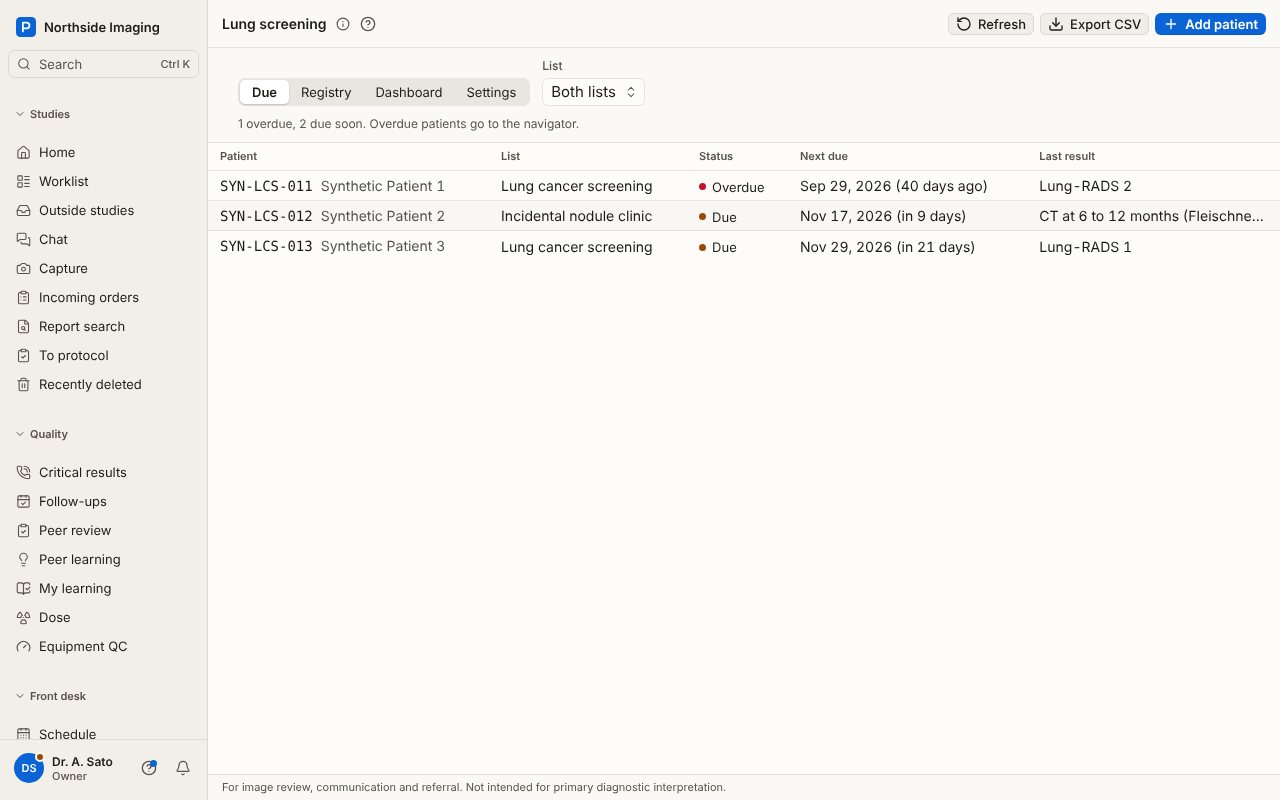
- Open Specialties › Lung screening. Due is selected.
- Overdue patients are listed first, then patients due soon.
- Select a patient to open their record.
- Select Reminder letter to show a plain reminder letter, then Print. The letter does not name the Lung-RADS category or smoking history.
- Record what you did under Record an event, such as Outreach by letter or phone.
A patient shows as due a set number of days before the due date, and as overdue a set number of days after it. Both are under Settings. When a patient becomes overdue, owners, admins and physicians get a notification, and the overdue patient is marked as sent to the navigator.
How to close a record
On the patient's record, pick a reason under Reason and select Close record. Reasons include aged out, quit more than 15 years ago, diagnosed, declined and moved. Pick Lost to follow-up for a patient you could not reach. Return to the program reopens the record.
Dashboard
Dashboard shows the program for the dates you pick: patients active and added, patients screened, screening CTs, positive results (Lung-RADS 3 or higher) and the positive rate, annual scan adherence, diagnostic procedures, lung cancers found, and shared decision-making visits. Lung cancers come from outcomes staff recorded and from EBUS stations whose pathology was recorded as malignant.
Export
Export CSV saves the registry as a spreadsheet for your registry submission or your own records. It does not include smoking history.
Fields and columns
- Patient: the patient ID and, where the practice has it, the name.
- List: Lung screening or Nodule clinic.
- Status: On track, Due, Overdue, Discharged or Lost to follow-up.
- Next due: the date of the next scan or visit, and how far away it is.
- Last result: the last Lung-RADS category, or the nodule follow-up the reader accepted.
If something goes wrong
- A patient did not join after a signed report: check that the report has a Lung-RADS category or an accepted Fleischner follow-up, and that the automatic step is on under Settings.
- The eligibility check says missing information: fill in the fields it marks with a question mark.
- Someone changed this record: another member saved the record after you opened it. Reload the page and make your change again.
Related
- Specialties: turn on the Pulmonology pack
- Roles: give the program permission to other roles
Updated November 8, 2026. Signed in? The same article is in the app's help panel: press
?.