Procedure settings
Set which rooms are IR and cath lab rooms and their AE titles, and write your practice's hold instructions, discharge criteria and indications.
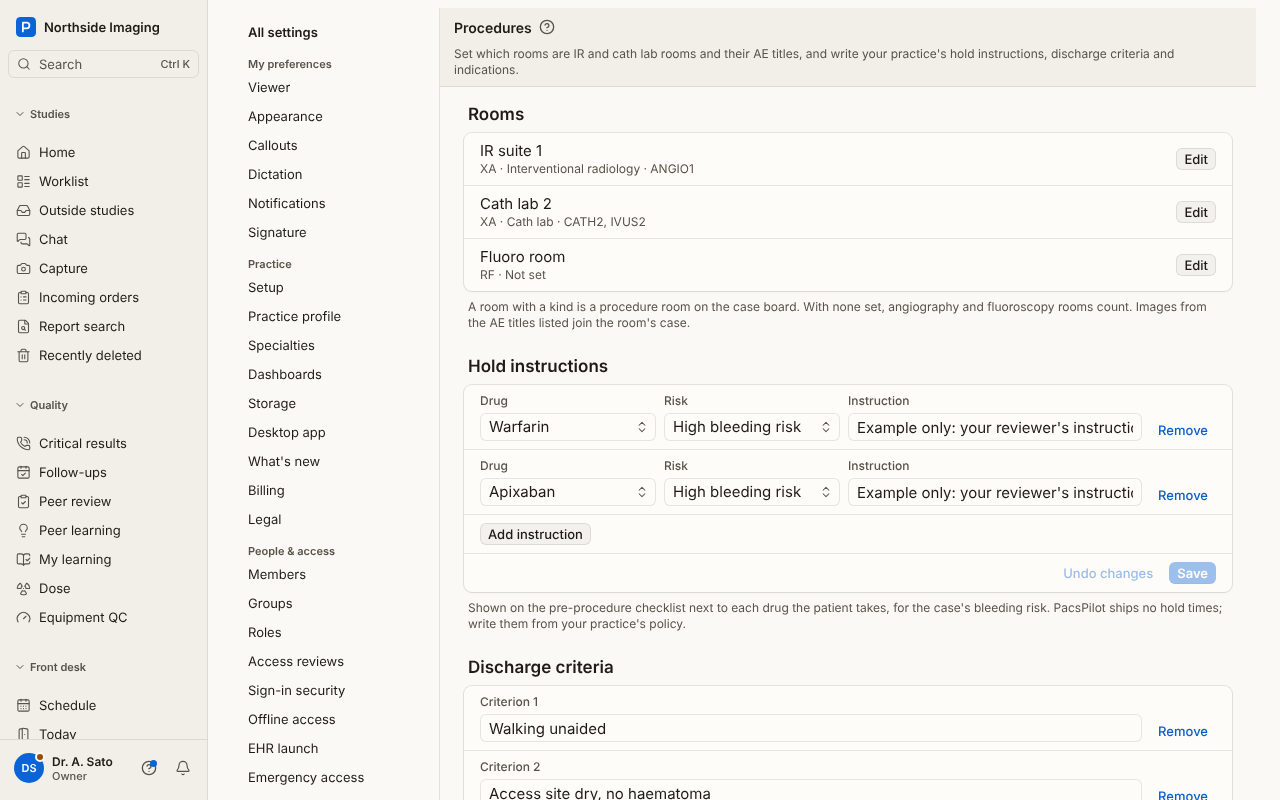
What this page is for
Settings › Procedures holds what the procedure case pages need from your practice: which scheduling rooms are procedure rooms, which imaging systems send from each room, and the lists the checklists offer. The page appears while the Interventional radiology or Cath lab pack is on under Settings › Specialties.
PacsPilot ships no hold times and no discharge criteria. The lists start empty, and an admin enters what your practice's reviewer approved.
Who can use it
Owners and admins. Every change is in the audit log.
How to set up a procedure room
- Add the room under Settings › Scheduling first.
- Press Edit on its row under Rooms.
- Pick the Kind: interventional radiology, cath lab, hybrid room, electrophysiology lab or office-based lab.
- Enter the AE titles of the imaging systems in the room, separated by commas.
- Press Save.
A room with no kind still counts as a procedure room when it is an angiography (XA) or fluoroscopy (RF) room. Clear settings puts a room back to that default.
How to write the lists
- Hold instructions. Press Add instruction, pick the drug and the bleeding risk, and type the instruction as your policy says it. The pre-procedure checklist shows it next to that drug when the case has that bleeding risk. There is one instruction per drug and risk.
- Discharge criteria. Each criterion is a box on the recovery checklist.
- Indications. The pre-procedure checklist offers these. Staff can still type an indication that is not on the list.
Press Save under a list to keep its changes, or Undo changes to go back to what was saved.
Fields and columns
| Field | What it holds |
|---|---|
| Kind | The kind of procedure room, shown on the case board. |
| AE titles | The DICOM names the room's imaging systems send with, up to 8. |
| Drug and Risk | The anticoagulant or antiplatelet and the procedure's bleeding risk. |
| Instruction | Your practice's hold instruction for that drug at that risk, up to 300 characters. |
| Discharge criteria | The boxes on the recovery checklist. |
| Indications | The indications offered on the pre-procedure checklist. |
If something goes wrong
- The list changed since you opened it. Someone else saved it first. Reload the page and make your change again.
- A room is missing. Only scheduling rooms appear. Add it under Settings › Scheduling.
- Images do not join the case. Check that the imaging system sends with an AE title listed on the room.
Related
Updated November 6, 2026. Signed in? The same article is in the app's help panel: press
?.