Practice profile
Set your practice's name, time zone, phone, NPI, specialties and address, and turn help, support requests and the developer page on or off.
What this page is for
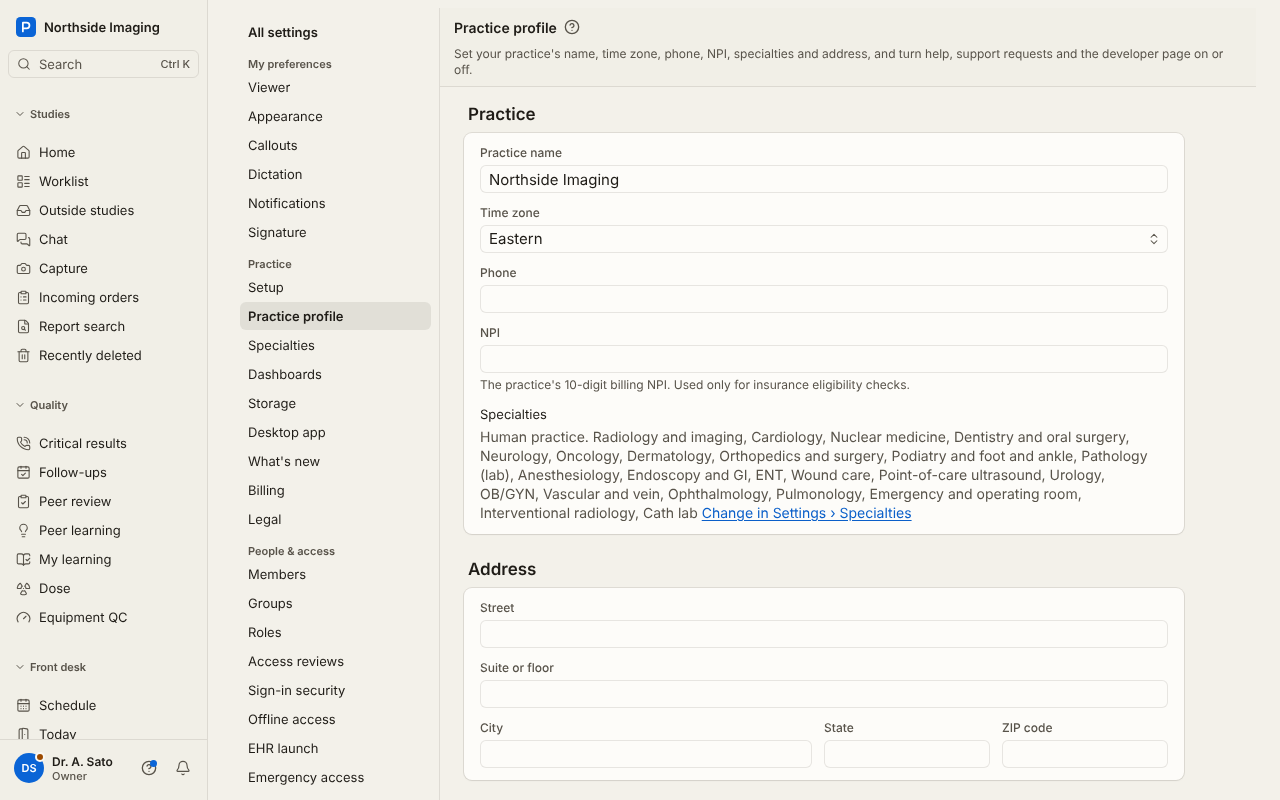
Settings › Practice profile holds your practice's basic details: its name, time zone, phone, billing NPI, specialties and address. Reports and referral letters print times in the practice time zone.
The Help and support group on the same page turns the help panel, support requests and the developer page on or off for the whole practice.
Who can use it
Owners and admins can open this page. It needs permission to change practice settings. A custom role with Change practice settings can open it too.
How to edit the practice profile
- Open Settings › Practice profile.
- Check the Practice name.
- Choose the Time zone. You cannot save until one is chosen.
- Enter the Phone, NPI and Specialties if you use them.
- Under Address, enter the Street, City, State and ZIP code. Suite or floor is optional.
- Press Save. The page shows "Practice profile saved".
If you have not saved the profile yet, the page asks you to check the details from your signup and add your time zone.
How to turn help and support on or off
- Under Help and support, switch Help panel, Support requests or Developer page on or off.
- Each switch saves at once.
Fields and columns
| Name | What it means |
|---|---|
| Practice name | The practice's name, 2 to 80 characters. Required. |
| Time zone | Eastern, Central, Mountain, Arizona, Pacific, Alaska, Hawaii or Atlantic (Puerto Rico). Required. Used for times on reports and referral letters. |
| Phone | The practice's phone number. |
| NPI | The practice's 10-digit billing NPI. Used only for insurance eligibility checks. |
| Specialties | Separate with commas, for example Cardiology, Radiology. Up to 10. |
| Street | The first address line. Required. |
| Suite or floor | An optional second address line. |
| City | Required. |
| State | The two-letter state code. Required. |
| ZIP code | Required. |
| Save | Saves the profile. |
| Help panel | Articles for each page, search and a short tour the first time a page is opened. |
| Support requests | Members can contact PacsPilot support from the app. No patient data is attached unless they add a study. |
| Developer page | API reference links, a sandbox practice with synthetic studies and test tokens. |
If something goes wrong
- Choose the practice's time zone to save.: choose a Time zone; Save stays unavailable until you do.
- Enter a phone number: use digits, spaces and the characters + ( ) . -, 7 to 32 characters.
- Enter a valid 10-digit NPI: check the NPI and enter all 10 digits.
- Unknown time zone: choose a time zone from the list.
- Settings changed at the same time; try again: reload the page and save again.
- Could not load the practice profile or Could not save the practice profile: reload the page and try again.
Related
Updated October 19, 2026. Signed in? The same article is in the app's help panel: press
?.