Procedure follow-up and IVC filters
One list of filter reviews, tube and drain exchanges, clinic and imaging visits after IR and cath lab cases, with reminders, letters and the IVC filter tracker.
What this page is for
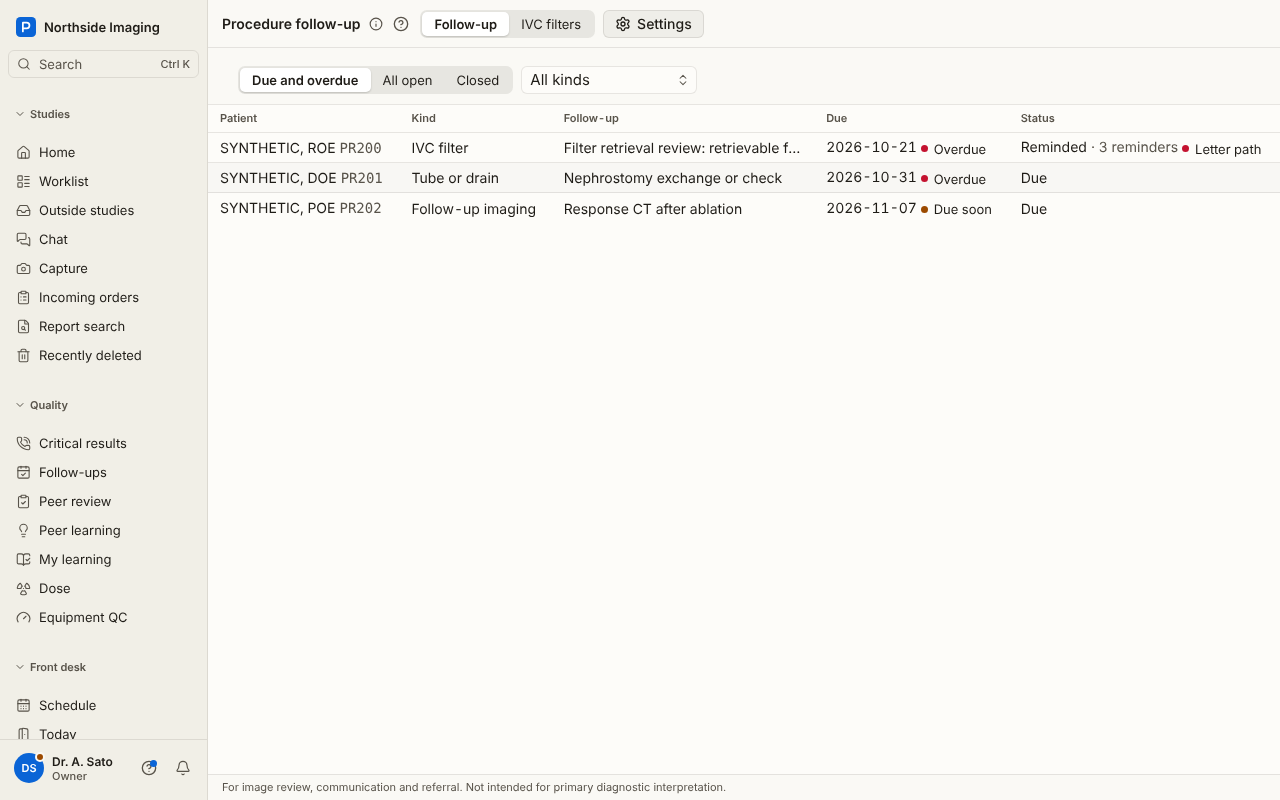
Procedure follow-up keeps what has to happen after an interventional radiology or cath lab case on one list: reviewing an IVC filter for retrieval, exchanging or checking a tube or drain, a clinic visit, and follow-up imaging such as a scan after an ablation or embolization. Each follow-up belongs to its case, shows when it is due and whether it is overdue, and keeps a record of every reminder sent.
The IVC filters tab is the filter tracker: every filter recorded on a filter placement case, how many days it has been in, its planned retrieval date, its status and each retrieval attempt.
The page appears while the Interventional radiology or Cath lab pack is on under Settings › Specialties.
Who can use it
Members who can see the schedule see the list and the tracker. Owners, admins, physicians, trainees, technologists and anesthetists can add follow-ups, record reminders and retrieval attempts. Owners and admins change the reminder settings. Members limited to a group do not see procedure follow-up. Each list opened and each change is in the audit log.
How to add a follow-up
- Open the case from Procedures.
- Under Follow-up, press Add follow-up.
- Pick the Kind: Tube or drain, Clinic visit or Follow-up imaging. For a tube or drain, pick its type.
- Pick the Due date, add a title and a note if you want, and press Add.
How to record an IVC filter
- Open the filter placement case.
- Under Follow-up › IVC filter, check the Placed date and pick the Indication.
- Type the device's make and model, and untick Retrievable filter for a permanent filter.
- Add a Planned retrieval date if the operator set one, and press Record filter.
A retrievable filter goes on the tracker with a review due on the planned retrieval date, or a set number of days after placement when there is no plan.
How to work the list
- Pick Due and overdue, All open or Closed, and a kind if you want.
- Select a follow-up to open it.
- Press Reminded operator after you remind the operator, or Print referrer letter to print a letter to the referring doctor. Each reminder is recorded with the date and who it went to.
- Pick Booked, Done or Cancelled under Status and press Save. For a tube or drain marked Done, pick the Next exchange or check to put the next one on the list.
After the practice's number of reminders with no answer, the follow-up shows Letter path. Press Print patient letter, and pick Lost to follow-up if the patient does not come back.
How to record a retrieval
- Open the IVC filters tab and select the filter.
- Under Retrieval attempt, pick the Outcome and Date, add a note, and press Record attempt.
Retrieved closes the filter's review. Attempt failed keeps the filter on the tracker with its next review date. Leave permanently takes it off the tracker.
How to change the reminder settings
Owners and admins press Settings on the page. The values are the first reminder in days after placement, the days between reminders, the number of reminders before the letter path opens, the days the Due soon band covers, and default days to the next exchange for each tube type. Tick I confirm these values for our practice and press Save.
Fields and columns
- Patient: from the case.
- Kind: IVC filter, tube or drain, clinic visit, follow-up imaging or radiation dose.
- Follow-up: what is due.
- Due: the due date, with Overdue or Due soon.
- Status: Due, Reminded, Booked, Done, Cancelled or Lost to follow-up, with the number of reminders.
- Days (filters): days since placement.
- Planned retrieval (filters): the operator's planned date, if set.
If something goes wrong
- "Reminder intervals are PacsPilot's starting values": nobody at the practice has confirmed the reminder settings yet. An owner or admin checks them under Settings and ticks the confirmation.
- "Lost to follow-up needs the follow-up past due": send the practice's number of reminders first; the status is offered once the follow-up is past due.
- "Close a filter follow-up from the filter tracker": record the retrieval or Leave permanently on the IVC filters tab.
- "The case already has a filter": open it from the case or the tracker instead.
- "It changed since you opened it": someone else saved first. Close and open it again.
- The page is missing from the sidebar: both the Interventional radiology and Cath lab packs are off, or your access is limited to a group.
Related
Good to know
- PacsPilot's starting reminder values are placeholders so that the tracker works on day one. They are not clinical guidance.
- Letters are printed from your browser. PacsPilot does not post or send them; the reminder records that one was printed.
Updated November 1, 2026. Signed in? The same article is in the app's help panel: press
?.